- 研究
- 产品
- 商业
- 开发者
- 公司
- 基金会(在新窗口中打开)
- 研究
- 产品
- 商业
- 开发者
- 公司
- 基金会(在新窗口中打开)
Codex:适用于每个角色、工具和工作流程 | OpenAI
2026年6月2日
Codex:适用于每个角色、工具和工作流程
新的角色特定插件、站点和注释帮助团队利用 Codex 完成更多工作。
收听文章 6:28
分享
让 Codex 按照您团队的方式工作
现在每周有超过500万人使用 Codex。Codex 最初是作为软件开发工具诞生的,但它对更多类型的工作越来越有用。非开发者——包括分析师、营销人员、运营人员、设计师、研究人员、投资者和银行家——约占 Codex 总用户的20%,并且增长速度是开发者的三倍以上。
今天,我们推出了利用 Codex 完成更多工作的新方式:适应您角色和工具的插件、帮助您就地完善结果的注释,以及创建交互式网站和应用的预览功能,这些网站和应用可通过 URL 与您的工作空间共享。
在 OpenAI 内部,非技术团队使用 Codex 构建内部应用、准备高管材料、创建仪表板,并将创意简报转化为反映品牌和设计约束的作品。在 Zapier,团队使用 Codex 从 Slack、Google Docs 和 Coda 等工具中提取知识,然后将这些背景信息转化为事后分析、事件响应计划和功能工单。在 NVIDIA,研究人员正在使用 Codex 加速实验工作流程,从寻找研究思路到为机器学习基础设施编写脚本。
00:00
让 Codex 按照您团队的方式工作
当 Codex 按照您团队的方式工作时最为有用:连接到您使用的工具,并准备好创建您所需的材料。
插件帮助 Codex 与您团队已使用的工具、背景信息和工作流程协同工作。今天,我们推出了六个新的角色特定插件,使 Codex 对更多类型的知识工作有用,无需编码:
- 每个角色特定插件(在新窗口中打开)都捆绑了相关的应用、技能、指令和工作流程。它们总共包含62个热门应用和110项技能。
- 数据分析插件(在新窗口中打开)帮助分析师和业务团队用数据回答问题。他们可以探索产品和业务数据,解释关键指标变化的原因,并使用 Snowflake、Databricks Genie、Hex 和 Tableau 等工具创建报告和仪表板,更多工具即将推出。
- 创意制作插件(在新窗口中打开)帮助营销和创意团队将简报转化为可供审查的素材。团队可以使用 Figma、Canva、Shutterstock、Picsart 和 Fal 等工具创建活动看板,制作和优化展示广告变体,以及生成产品生活方式照片或电商就绪的图像集。
- 销售插件(在新窗口中打开)帮助销售团队将客户背景信息融入推动交易进展的工作中。销售团队可以使用 Salesforce、HubSpot、Slack、Outreach、Clay、Rox 和 Actively 等工具找到高优先级客户和信号,准备客户会议,完成跟进,更新客户记录,制定成交计划,并审查有风险的交易。
- 产品设计插件(在新窗口中打开)专为将早期想法转化为可供团队审查的原型而构建。团队可以探索产品方向,审计用户流程,从实时 URL 制作原型,并使静态截图变得可交互,相关工作可在 Figma 和 Canva 等工具中继续推进。
- 公开股权投资插件(在新窗口中打开)帮助投资者理解市场和公司信息。他们可以使用 Moody’s、Daloopa、Datasite、FactSet、LSEG、S&P、PitchBook 和 Hebbia 的信息审查财报、比较公司、跟踪信号,并评估投资论点是在加强还是减弱。
- 投资银行插件(在新窗口中打开)帮助银行家将研究和尽职调查转化为客户就绪的材料。他们可以使用可信数据准备推介材料,分析可比公司和交易,并将尽职调查转化为建议。
数据分析 创意制作 产品设计 销售 公开股权投资
00:00
使用数据分析插件进行业务绩效分析
插件开箱即用。团队也可以根据自身工作流程进行调整,或为自有系统和流程构建并分享自定义插件。
更多针对特定角色的插件即将推出,包括企业金融、私募股权投资、营销策略、战略咨询和法律领域。而这仅仅是个开始:我们正在构建一个开放生态系统,让合作伙伴能够直接在 Codex 和 ChatGPT 中创建和部署自己的插件。



























































与站点分享你的工作
从面向企业和商业客户的预览版开始,Codex 现在可以创建并分享交互式、托管的网站和应用。
站点是你创意的新画布。Codex 可以将你的想法、分析和计划转化为仪表盘、规划器、审查工作区、项目看板、画廊和轻量级工具。目前,站点可以通过 URL 与工作区中的任何人分享,为团队提供一个共同的空间来探索工作、贡献意见、跟踪进度并共同决策。
让 Codex 为即将到来的客户审查创建一个站点,它将生成一个交互式网页,包含相关的产品更新、未解决问题、使用趋势以及该账户的下一步行动。让它根据财务模型构建一个场景规划器,这样领导者可以比较假设,而不是翻阅文档中的标签页。让它将发布材料转变为一个动态中心,团队可以在其中找到最新的消息、里程碑、负责人和决策。然后让 Codex 在细节变化时保持站点更新。
团队无需将工作适应于单一工具或文件的限制,而是可以创建适合工作的站点。而且站点并非静态。它们还可以帮助跟踪重大项目的进展、指导客户服务代表,或作为团队创意简报的存储库。
收入预测规划器 活动运营仪表盘 产品发布中心
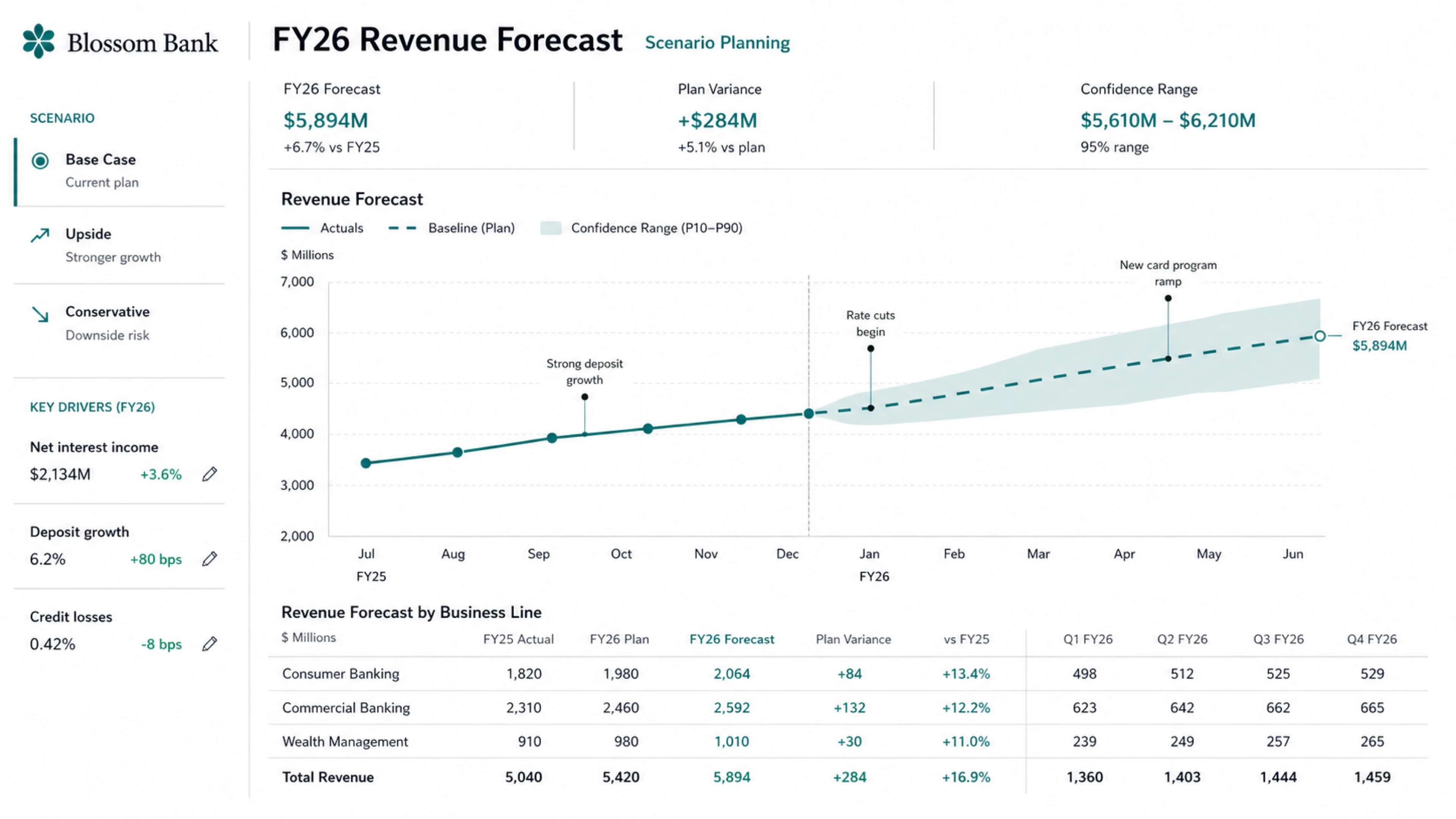
我们还在与早期合作伙伴合作,包括 Vercel、Wix、Base44、Replit、Lovable、Figma、Webflow 和 Emergent,共同构建站点合作伙伴生态系统。
使用注释优化你的工作
开发者已经在 Codex 中使用注释来优化 Codex 创建的代码、Markdown 文件和网站。通过注释,你可以指向需要优化的确切部分,并告诉 Codex 需要更改什么。这种工作方式现在扩展到你创建的内容,如文档、电子表格和幻灯片。
选择站点中的导航栏,让 Codex 更新字体。高亮投资论点中的一项声明,让 Codex 说明其来源。标记幻灯片上的图表,要求更清晰的标签。Codex 会将更新集中在你选择的部分,这样你就可以优化工作,而无需从头开始或重新修改你已经喜欢的部分。注释使 Codex 在初稿之后更有用,此时工作需要判断、反馈和迭代。
00:00
可用性与入门
特定角色的插件正在受支持区域的 Codex 中逐步推出。你可以从 Codex 插件目录安装它们,Codex 将帮助你完成设置。Codex 还可以帮助你自定义插件。对于商业和企业工作区,管理员可以在工作区设置中控制(在新窗口中打开)底层应用权限。
站点正在通过 Codex 应用向商业和企业团队推出预览版。企业管理员可以在管理设置中启用站点(在新窗口中打开)。
探索更多关于团队如何使用 Codex 的故事,或联系我们的团队开始使用。
作者
OpenAI
继续阅读

GPT-5.6 现已成为 Microsoft 365 Copilot 中的首选模型 产品 2026年7月9日
ChatGPT 现已成为你最具雄心工作的合作伙伴 产品 2026年7月9日

GPT-5.6:随你雄心扩展的前沿智能 产品 2026年7月9日
研究
最新进展
安全
产品
- ChatGPT(在新窗口中打开)
- ChatGPT Business(在新窗口中打开)
- ChatGPT Enterprise(在新窗口中打开)
- ChatGPT for Education(在新窗口中打开)
- Codex
- 发布说明
API 平台
商业
开发者
公司
支持
更多
条款与政策
(在新窗口中打开)(在新窗口中打开)(在新窗口中打开)(在新窗口中打开)(在新窗口中打开)(在新窗口中打开)(在新窗口中打开)
OpenAI © 2015–2026 您的隐私选择
英语 美国
Log inTry ChatGPT(opens in a new window)
- Research
- Products
- Business
- Developers
- Company
- Foundation(opens in a new window)
Codex for every role, tool, and workflow | OpenAI
June 2, 2026
Codex for every role, tool, and workflow
New role-specific plugins, Sites, and annotations help teams do more with Codex.
Listen to article 6:28
Share
Make Codex work the way your team does
More than 5 million people now use Codex every week. Codex started as a tool for software development, but it's increasingly useful for more kinds of work. Non-developers—including analysts, marketers, operators, designers, researchers, investors, and bankers—make up about 20% of overall Codex users and are growing more than 3x as fast as developers.
Today, we’re introducing new ways to do more of your work with Codex: plugins that adapt Codex to your role and tools, annotations that help you refine the result in place, and a preview of the ability to create interactive websites and apps you can share with your workspace using a URL.
Inside OpenAI, non-technical teams use Codex to build internal apps, prepare executive materials, create dashboards, and turn creative briefs into work that reflects brand and design constraints. At Zapier, teams use Codex to pull knowledge from tools like Slack, Google Docs, and Coda, then turn that context into postmortems, incident response plans, and feature tickets. At NVIDIA, researchers are using Codex to speed up experiment workflows, from finding research ideas to writing scripts for machine learning infrastructure.
00:00
Make Codex work the way your team does
Codex is most useful when it works the way your team does: connected to the tools you use and ready to create the materials you need.
Plugins help Codex work with the tools, context, and workflows your team already uses. Today, we’re launching six new role-specific plugins that make Codex useful for more kinds of knowledge work, no coding required:
- Each role-specific plugin(opens in a new window) bundles the relevant apps, skills, instructions, and workflows. Together, they include 62 popular apps and 110 skills.
- The data analytics plugin(opens in a new window) helps analysts and business teams answer questions with data. They can explore product and business data, explain why key metrics changed, and create reports and dashboards using tools like Snowflake, Databricks Genie, Hex, and Tableau, with more coming soon.
- The creative production plugin(opens in a new window)helps marketing and creative teams turn a brief into assets they can review. Teams can create campaign boards, make and refine display ad variations, and produce product lifestyle shots or ecommerce-ready image sets with tools like Figma, Canva, Shutterstock, Picsart, and Fal.
- The sales plugin(opens in a new window) helps sales teams bring customer context into the work that moves deals forward. Sales teams can find high-priority accounts and signals, prepare for customer meetings, complete follow-ups, update customer records, build close plans, and review deals at risk using tools like Salesforce, HubSpot, Slack, Outreach, Clay, Rox, and Actively.
- The product design plugin(opens in a new window) is built for turning early ideas into prototypes teams can review. Teams can explore product directions, audit user flows, prototype from a live URL, and make static screenshots interactive, with work that can be carried forward in tools like Figma and Canva.
- The public equity investing plugin(opens in a new window) helps investors make sense of market and company information. They can review earnings, compare companies, track signals, and assess whether an investment thesis is strengthening or weakening using information from Moody’s, Daloopa, Datasite, FactSet, LSEG, S&P, PitchBook, and Hebbia.
- The investment banking plugin(opens in a new window) helps bankers turn research and diligence into client-ready materials. They can prepare pitch materials, analyze comparable companies and transactions, and turn diligence into recommendations using trusted data.
Data analytics Creative production Product design Sales Public equity investing
00:00
Business performance analysis with the data analytics plugin
Plugins work out of the box. Teams can also adapt them to their workflows or build and share custom plugins for their own systems and processes.
More role-specific plugins are coming soon, including Corporate Finance, Private Equity Investing, Marketing Strategy, Strategy Consulting, and Legal. And this is just the start: we’re building toward an open ecosystem where partners can create and deploy their own plugins directly in Codex and ChatGPT.
Share your work with sites
Starting in preview for business and enterprise customers, Codex can now create and share interactive, hosted websites and apps.
Sites are a new kind of canvas for your ideas. Codex can take your ideas, analysis, and plans and turn them into dashboards, planners, review workspaces, project boards, galleries, and lightweight tools. Today, sites can be shared with anyone in your workspace via URL, giving teams a shared place to explore work, contribute input, track progress, and make decisions together.
Ask Codex to create a site for an upcoming customer review, and it’ll generate an interactive webpage with the relevant product updates, open questions, usage trends, and next steps for that account. Ask it to build a scenario planner from a financial model, so leaders can compare assumptions instead of reading through tabs in a doc. Ask it to turn launch materials into a living hub where teams can find the latest messaging, milestones, owners, and decisions. Then ask Codex to keep the site up to date as details change.
Instead of adapting work to the limits of a single tool or file, teams can create sites that fit the work. And sites aren’t static. They can also help track progress for a major project, help guide customer service reps, or act as a repository for your team’s creative briefs.
Revenue forecast planner Event operations dashboard Product launch hub
We’re also working with early partners including Vercel, Wix, Base44, Replit, Lovable, Figma, Webflow, and Emergent as we build towards a sites partner ecosystem.
Refine your work with annotations
Developers already use annotations in Codex to refine code, Markdown files, and websites Codex creates. With annotations, you point to the exact part you want to refine and tell Codex what needs to change. That way of working now extends to content you create, like documents, spreadsheets, and slides.
Select the navigation bar in a site and ask Codex to update the font. Highlight a claim in an investment thesis and ask Codex where it came from. Mark a chart on a slide and ask for a clearer label. Codex focuses the update on the part you selected, so you can refine your work without starting over or reworking the parts you already like. Annotations make Codex more useful after the first draft, when the work needs judgment, feedback, and iteration.
00:00
Availability and getting started
Role-specific plugins are rolling out in Codex in supported regions. You can install them from the Codex plugin directory and Codex will help get you set up. Codex can also help you customize a plugin. For Business and Enterprise workspaces, admins can control(opens in a new window) underlying app permissions in workspace settings.
Sites are rolling out in preview for Business and Enterprise teams through the Codex app. Enterprise admins can enable sites(opens in a new window) in admin settings.
Explore more stories about how teams use Codex, or get in touch with our team to get started.
Author
OpenAI
Keep reading
GPT-5.6 is now the preferred model in Microsoft 365 Copilot Product Jul 9, 2026
ChatGPT is now a partner for your most ambitious work Product Jul 9, 2026
GPT-5.6: Frontier intelligence that scales with your ambition Product Jul 9, 2026
Research
Latest Advancements
Safety
Products
- ChatGPT(opens in a new window)
- ChatGPT Business(opens in a new window)
- ChatGPT Enterprise(opens in a new window)
- ChatGPT for Education(opens in a new window)
- Codex
- Release Notes
API Platform
Business
Developers
- Apps SDK(opens in a new window)
- Open Models
- Docs(opens in a new window)
- Resources(opens in a new window)
- Developer Forum(opens in a new window)
Company
Support
More
Terms & Policies
(opens in a new window)(opens in a new window)(opens in a new window)(opens in a new window)(opens in a new window)(opens in a new window)(opens in a new window)
OpenAI © 2015–2026 Your privacy choices
English United States
本文内容采集自官方网站,排版和翻译可能与原页面存在差异。
阅读官方全文