介绍 ChatGPT Work,ChatGPT 中的智能代理,助你应对更宏大的任务
它能跨应用和工作流收集信息,生成表格、幻灯片、文档和网页应用等成品,并通过将复杂项目分解为小步骤并独立完成,持续跟进数小时。
借助内置的 Codex 技术,ChatGPT 如今已能超越回答问题,在网页、移动端和桌面端真正完成实际工作。每周有超过 500 万人使用 Codex。尽管它最初是面向开发者的编码代理,但现在已有超过 100 万人将其用于软件开发之外的工作,这表明其能力可支持更广泛的任务。
为了更好地管理这些任务,ChatGPT Work 由我们最新的前沿模型 GPT‑5.6 驱动,该模型也于今日同步推出。GPT‑5.6 使 ChatGPT 在多步骤任务推理以及根据你的模板和参考文件创建材料方面达到业界领先水平。
学习使用 ChatGPT Work 的最佳方式是给它一个你已熟悉的任务:分析月末预算差异、将源材料转化为营销活动简报,或为销售会议做准备。你可以跟踪其进度、回答问题、调整方向,并批准重要操作。
你甚至可以要求 ChatGPT Work 通过单个请求接管整个工作流。例如,它可以将客户研究转化为活动简报,利用该简报创建营销素材,并根据不同市场调整这些素材,同时每一步都保留上下文。
即使你不在电脑或手机旁,ChatGPT Work 也能通过定时任务推动项目进展。例如,它可以独立将来自 Microsoft Teams 和 Slack 的新消息转化为更新的文档或幻灯片,然后与团队分享重要变更。
在早期测试中,我们看到了 ChatGPT Work 如何拓展用户的能力:
1 / 4
OpenAI 内部(包括财务和销售部门)几乎所有团队现在都使用 ChatGPT Work 和 Codex 来加快速度、应对更困难的任务,并花更多时间与客户相处。
- 在销售方面,ChatGPT Work 在 24 小时内将一次探索性对话转化为针对关键问题的定制概念验证——这一过程通常需要数周。ChatGPT 整理了笔记,将请求路由给解决方案架构师,并与技术团队协作,使负责人能够专注于客户,成为高价值的咨询合作伙伴。
- 在财务方面,ChatGPT Work 通过帮助团队查找源数据、将其导入 Excel 或 Sheets、对账、创建幻灯片并验证结果,将月末结账和预测从数天缩短至数小时。这让财务团队有更多时间了解预测中的变化、解释变化原因,并就公司下一步行动向领导层提供建议。
在网页和移动端,ChatGPT Work 今日起面向 Pro、Enterprise 和 Edu 计划推出。未来几天将逐步向 Plus 和 Business 计划开放。在 ChatGPT 桌面应用中,聊天、Work 和 Codex 在所有计划(包括免费计划)中均可使用,并已在全球范围内提供 Windows 和 Mac 下载(在新窗口中打开)。
随处工作。在桌面端更进一步。
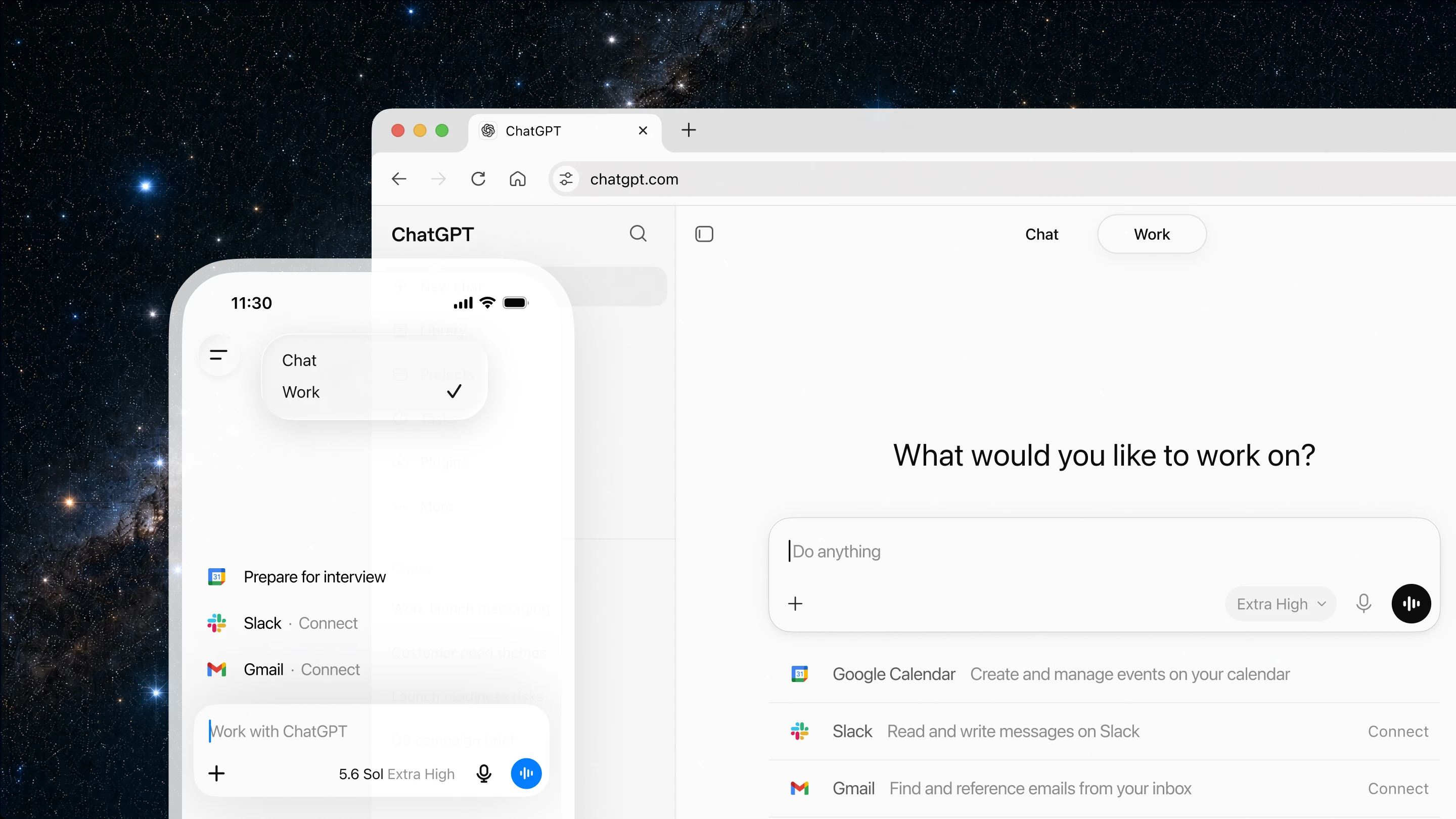
ChatGPT Work 旨在让你无论身在何处都能推动任务进展。你可以要求它从手机开始一项任务,在移动中审阅草稿,或在会议间隙检查长时间运行工作流的状态。回到办公桌后,你可以在网页上继续同一项工作。
为了获得更强大的体验,ChatGPT 桌面应用现在更进一步。在桌面端,ChatGPT 可以使用你的本地文件和应用程序来完成工作。对于基于网页的工作,ChatGPT 的新内置浏览器使其能够引入网站、工具和在线文件,为你提供一个推进工作的统一场所。
从今天开始,Codex 应用将与新的 ChatGPT 桌面应用合并。Codex 仍然是面向开发者和技术专业人士的强大编码代理,现在具备新功能(在新窗口中打开),涵盖核心工作流,包括差异内联编辑、侧面板中的拉取请求审查、更快的计算机使用(由 GPT‑5.6 驱动),以及单个项目中支持多个代码仓库。
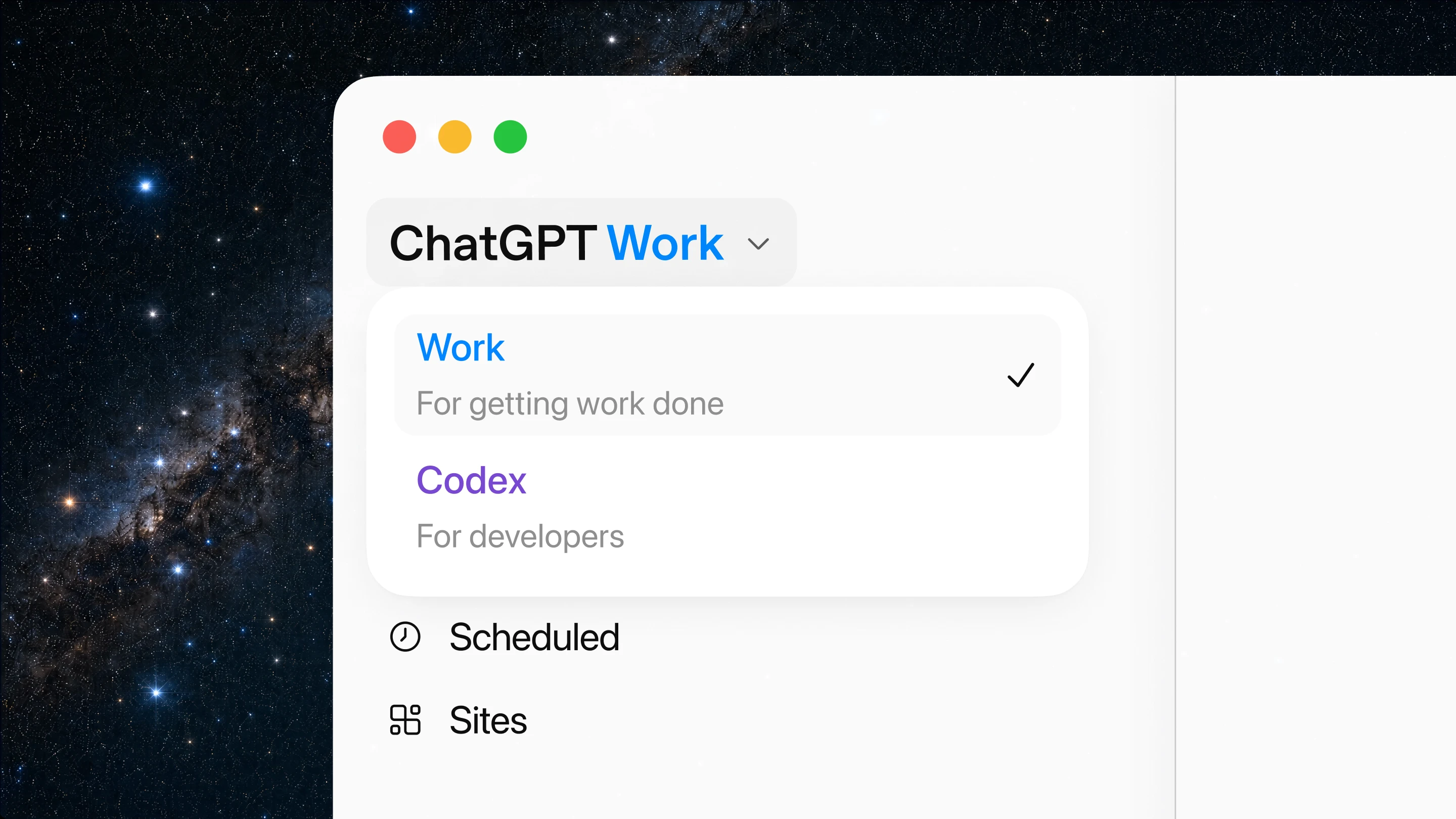
从你的应用和工作流创建幻灯片、表格、文档和站点
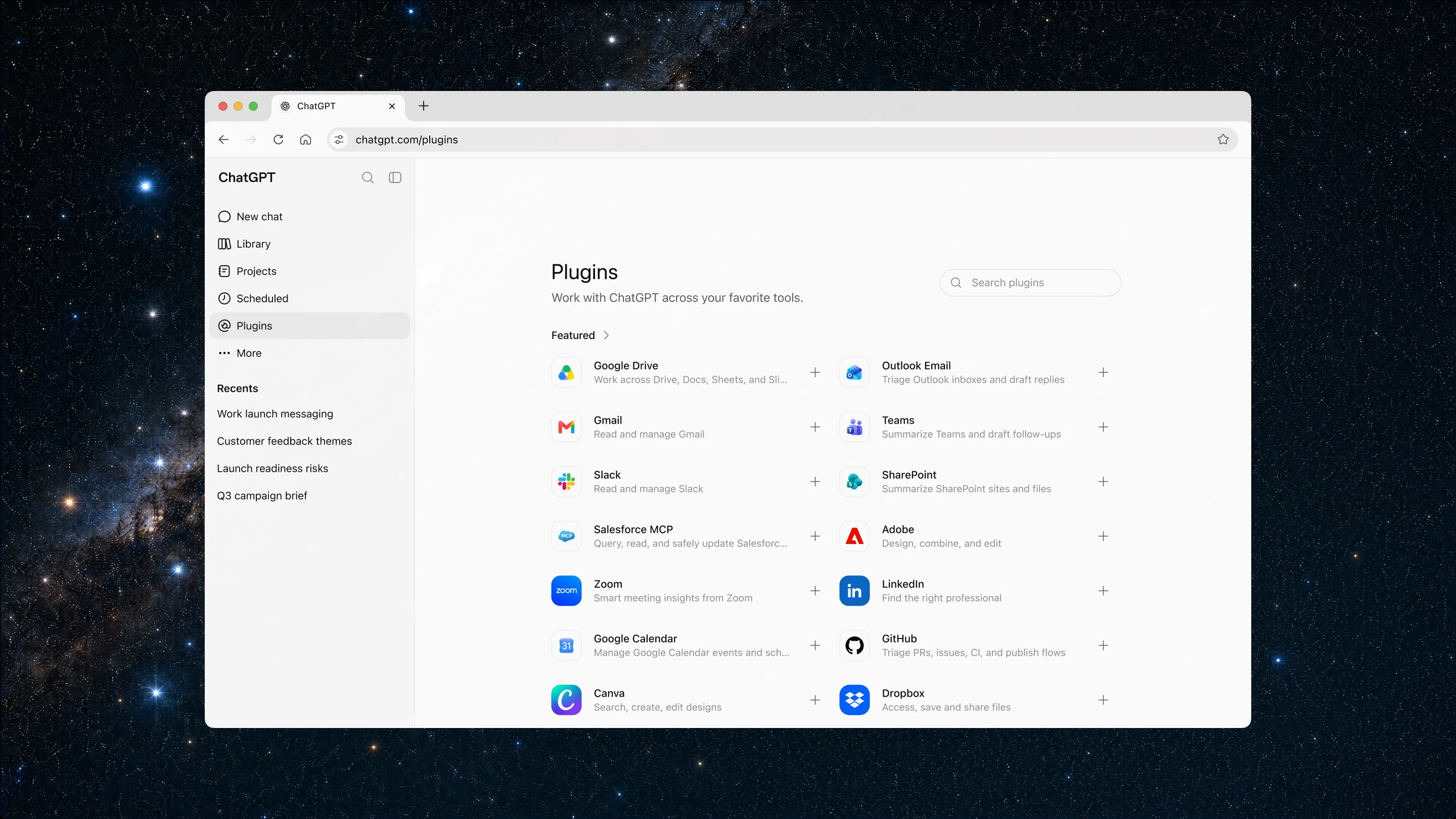
要开始使用 ChatGPT Work,请使用插件连接你工作中已有的工具和上下文。
插件将 ChatGPT 连接到应用和系统,如 Slack 和 Microsoft Teams、Google 云端硬盘和 SharePoint、电子邮件、日历、CRM、项目跟踪器以及其他内部工具。ChatGPT 会根据你的提示自动知道何时引用插件,但你也可以通过输入“@”后跟应用名称来指示 ChatGPT 从特定应用获取上下文。新的统一插件目录将所有插件集中在一个地方,ChatGPT 可以在对话过程中建议相关插件。
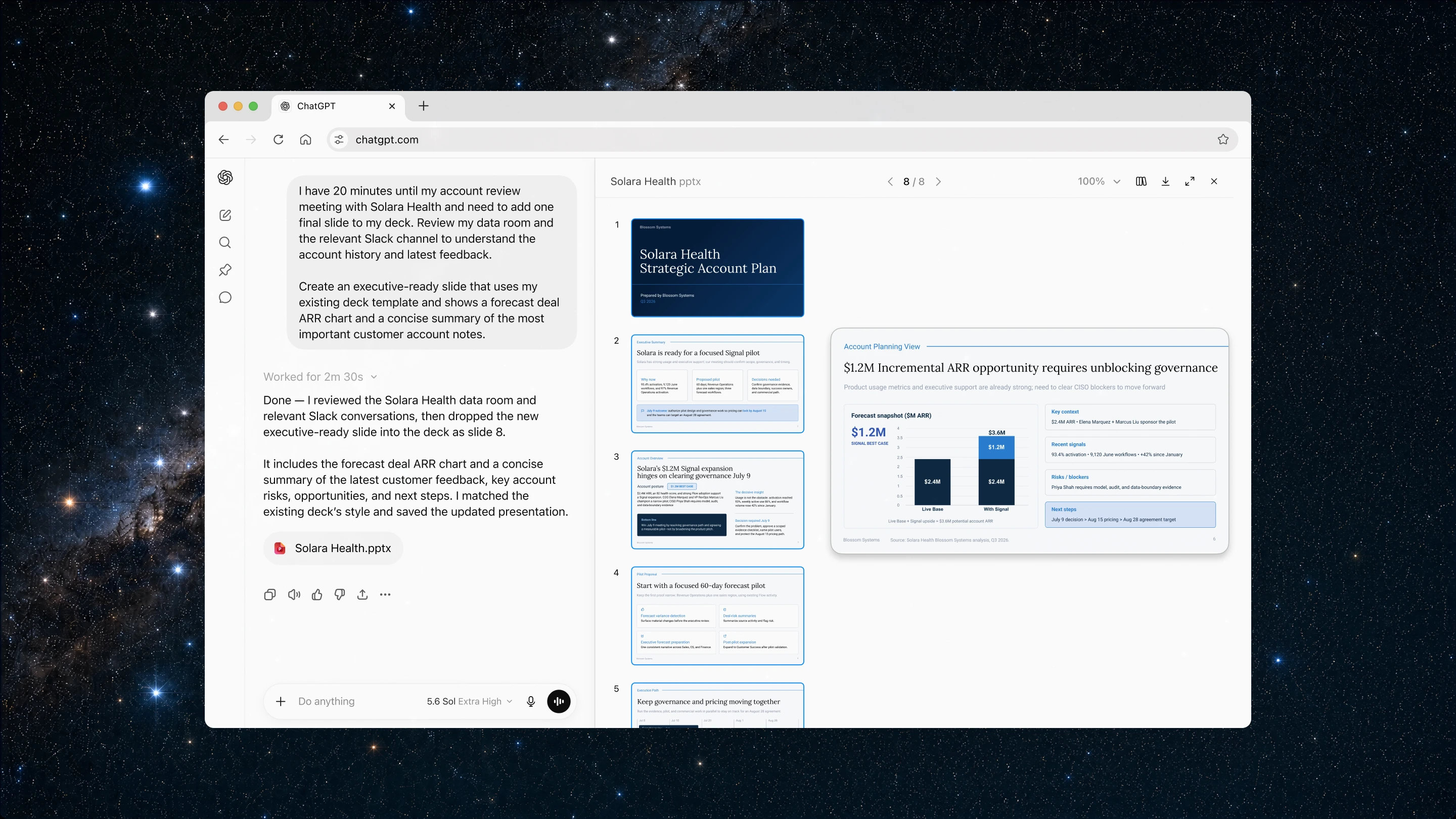
一旦你的应用和工具连接完毕,ChatGPT 就能理解你的意图,从相关来源获取信息,创建文档、演示文稿和分析报告,并在后台不断优化草稿,同时你始终掌握控制权。
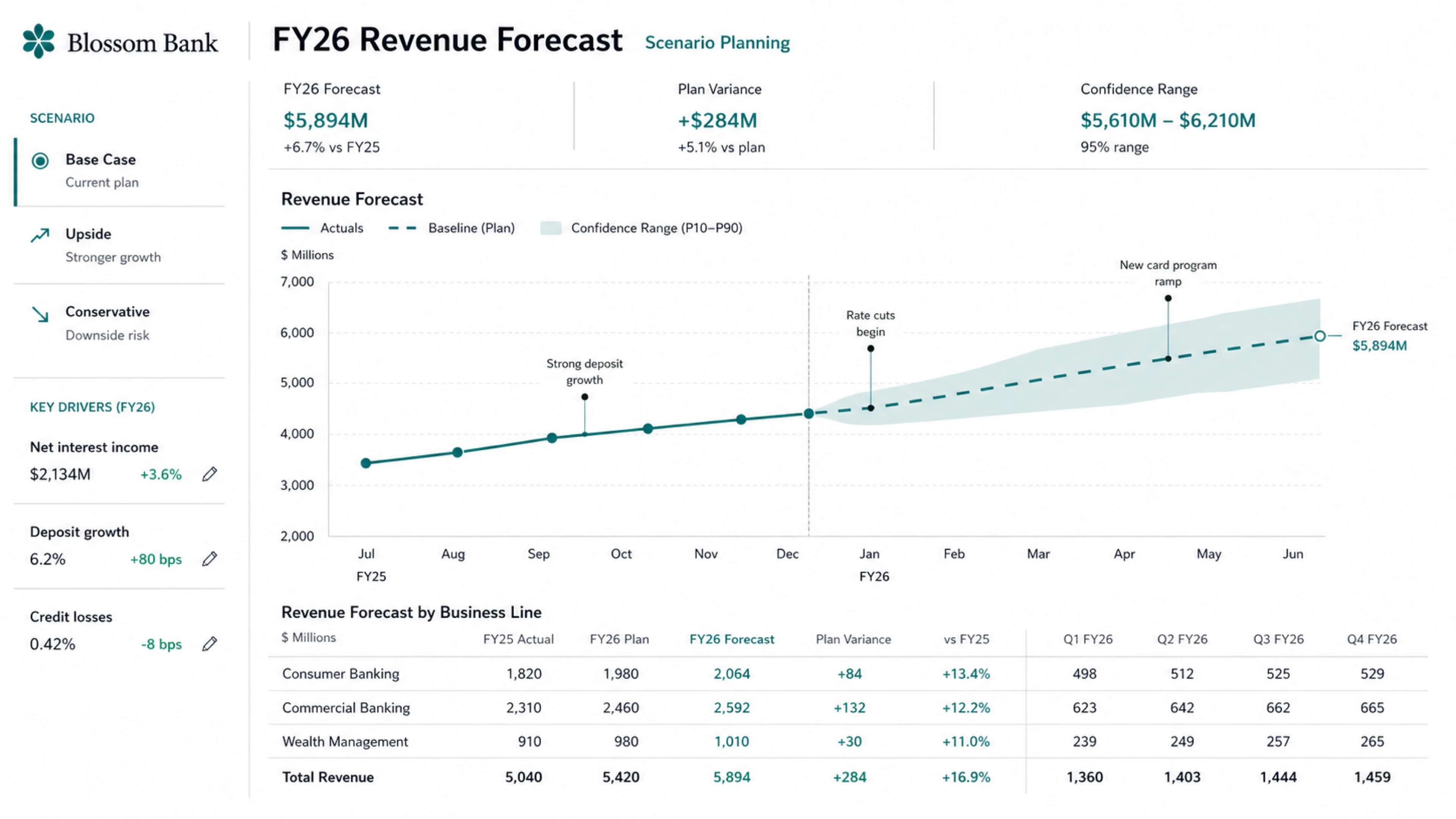
我们还在 ChatGPT 中公开测试了“站点”功能。借助站点,你可以将自己的工作或想法转化为交互式站点或网络应用,并通过链接与团队或公众分享。当你想要创建实时仪表盘、项目追踪器、发布日历、原型、内部门户和交互式报告等内容时,站点功能非常实用。你可以在 ChatGPT 内部直接测试所构建的站点,还能将最新的网络上下文引入项目。当底层信息发生变化时,ChatGPT 也可以更新这些站点。
将重复性任务委派出去,专注于重要工作
ChatGPT Work 可以帮助你处理重复性任务,让你腾出精力从事更有影响力的工作。
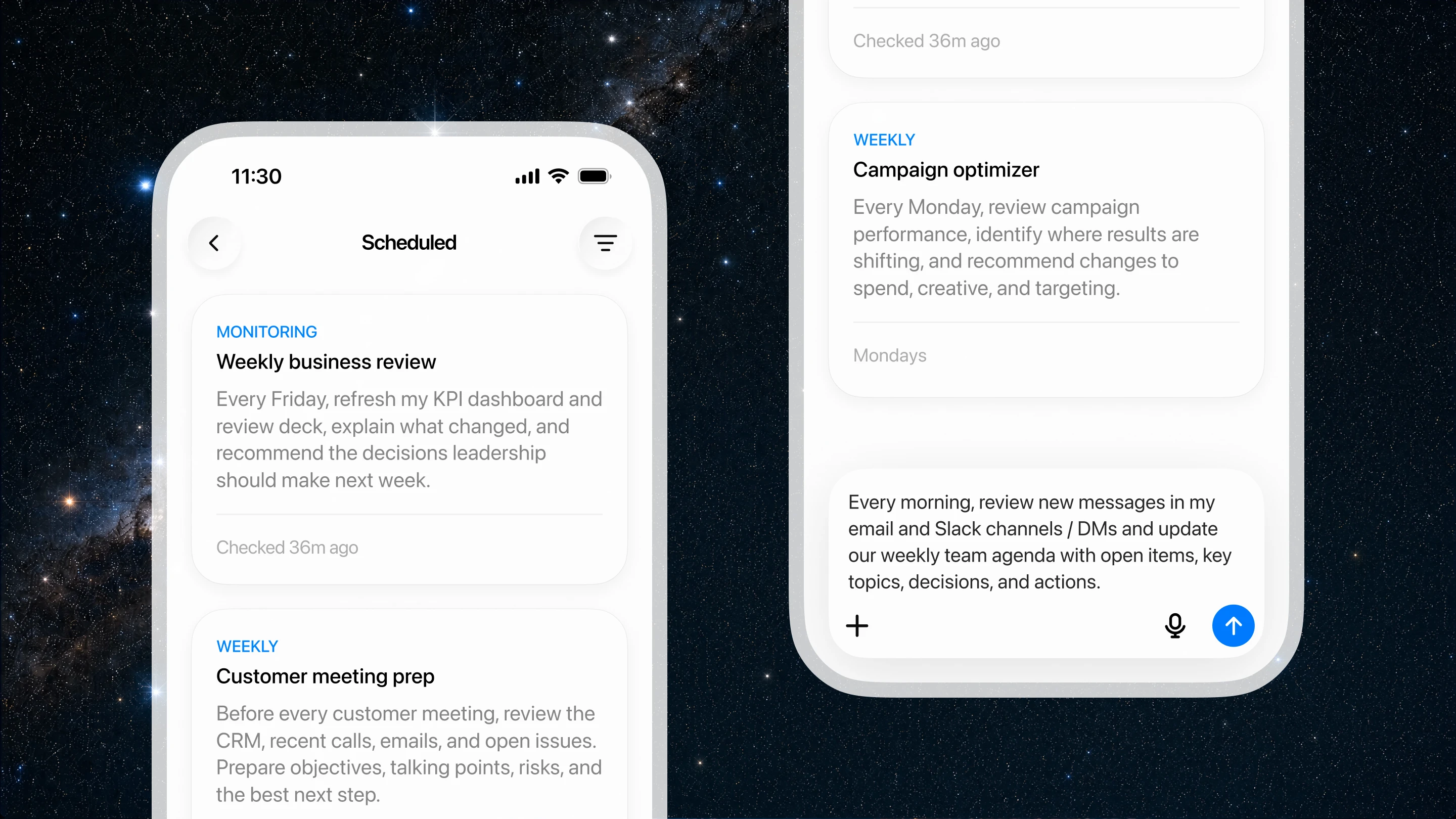
定时任务功能让你可以要求 ChatGPT 执行一次操作、按计划重复执行或在事件发生时执行,也可以随时间监控变化。
定时任务可以使用你已连接的应用程序和浏览器来:
- 每周查看新的 Slack 更新,并刷新定期会议议程。
- 每天早上检查网站和仪表盘,总结变化内容并发送报告。
- 监控新的客户反馈,并将重复出现的主题转化为优先处理的产品创意。
- 当通过电子邮件收到新反馈时,更新演示文稿。
你可以掌控 ChatGPT 与你协作的方式。你可以决定它能访问哪些内容、何时进行检查,以及在采取行动前何时需要你的批准。随着优先级的变化,你可以审查进度并调整工作方向。
在网络和桌面应用中更快完成工作
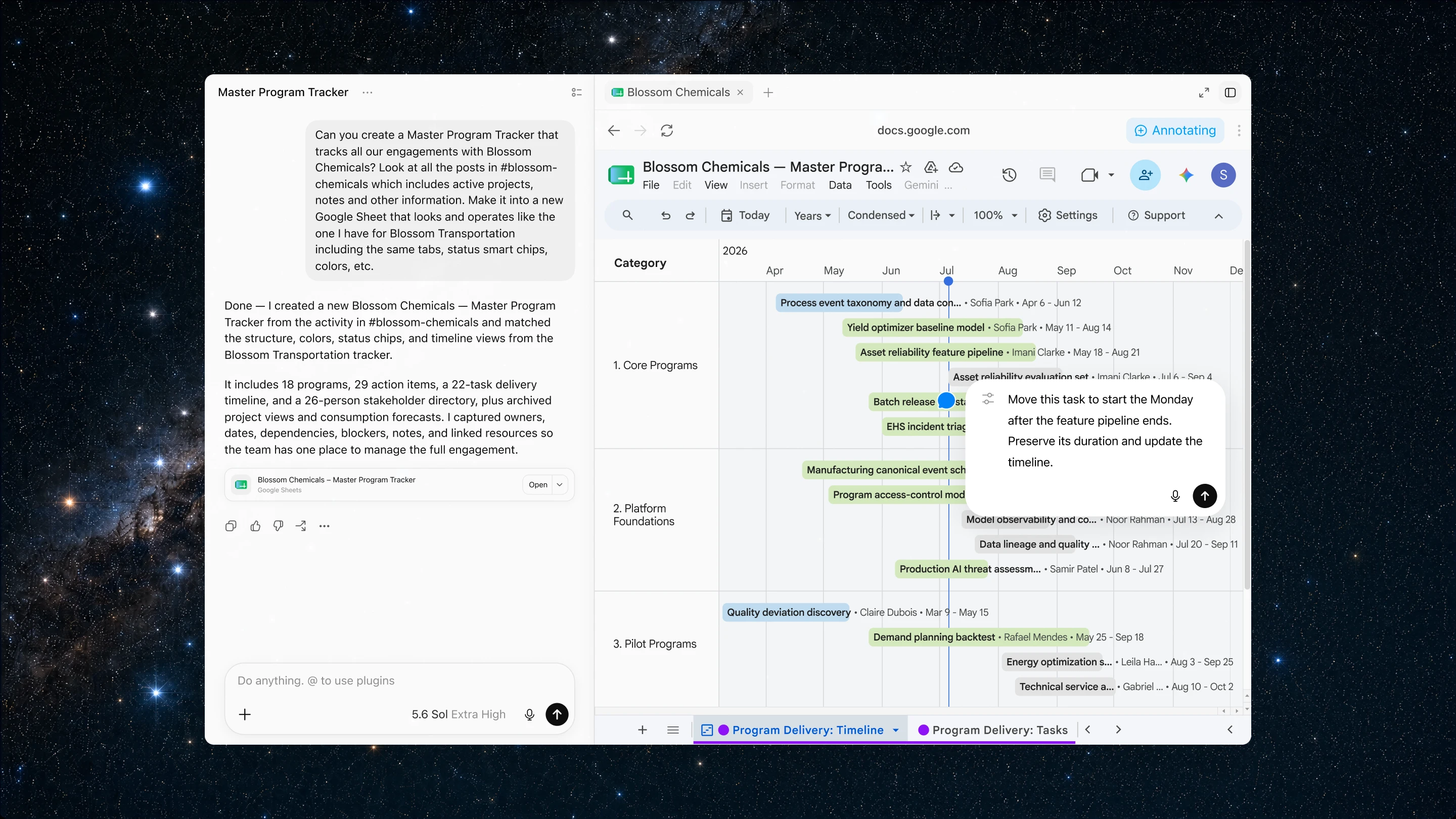
在桌面上,ChatGPT 现在内置了一个浏览器,帮助你在线收集信息、使用基于网络的工具,并在一个地方完善基于网络的工作。
你可以让 ChatGPT 研究市场、比较来源、从网站提取信息,或在应用内打开并完善来自 Google Workspace 和 Microsoft 365 的文件。它可以使用浏览器引入最新上下文,跨网页执行步骤,并在你审查和指导结果的同时保持工作推进。
在桌面上,计算机使用功能让 ChatGPT 可以代表你使用计算机,在后台跨应用、工具和浏览器执行任务——点击、输入和移动文件到需要的位置。你可以将其用于一次性任务,或作为定时任务的一部分,当重复性工作包含计算机上的步骤时。
我们也在更新 Chrome 扩展程序,使得可以直接在 Chrome 侧边栏中使用 ChatGPT。这些能力基于我们从 Atlas 以及帮助理解代理工具如何让基于浏览器的工作更有用的用户那里学到的经验。我们将开始逐步淘汰独立的 Atlas 浏览器,并向用户分享如何过渡到 ChatGPT 的信息。
从目标到每个团队的实际成果
ChatGPT Work 开箱即用,适用于各种工作:它可以支持使用每个团队选择连接的应用程序、文件和工具的复杂工作流程。以下是我们在各团队中看到的实际用例:
销售: 销售人员可以在账户活动变化时保持实时指挥中心的最新状态,而无需手动重建账户计划。ChatGPT Work 可以综合新信号、更新下一步行动,帮助销售人员将更多时间用于推进交易。[示例提示:创建一个自动化程序,监控新的账户活动,并每天上午 8 点更新此站点]
面向组织的安全与治理
即使 ChatGPT 为你的团队承担更多实质性工作,你的组织仍能保持控制。ChatGPT 建立在 ChatGPT Enterprise 的安全、隐私、合规和工作区管理基础之上。Enterprise 和 Edu 管理员可以集中管理谁有权访问、ChatGPT 可以使用哪些公司上下文、可以连接哪些工具以及可以执行哪些操作。合规 API(在新窗口中打开)提供了对 ChatGPT Work 对话和操作的大规模可见性,以支持企业监督。
控制措施针对每种环境量身定制。在网络上,管理员可以管理对插件和连接工具的访问、配置云环境的浏览器使用和网络访问,并限制连接系统中的敏感操作。在桌面上,ChatGPT Work 基于 Codex 的企业治理模型(在新窗口中打开)和管理员控制(在新窗口中打开),为涉及本地文件、应用、浏览器和工具的工作带来企业级安全保障——包括管理代理网络访问的策略。
自动审查通过使用我们最先进的模型,在涉及连接工具和 API 的重要操作发生前进行审查,帮助防止未经授权共享敏感信息,从而增加了一层额外保护。
可用性与定价
ChatGPT Work 今天开始在网页和移动端推出,首先面向 Pro、Enterprise 和 Edu 用户,并在未来几天扩展到 Plus 和 Business 用户。更新后的 ChatGPT 桌面应用(在新窗口中打开)今天在全球范围内适用于 Mac 和 Windows,包括 Free 在内的所有计划用户均可使用 Chat、Work 和 Codex。
如果你已经在使用 Codex 应用,可以像往常一样更新,它将变为新的 ChatGPT 桌面应用。开发者可以在打开桌面应用时将 Codex 设为默认视图,并选择 Codex 标志作为应用图标。桌面版 Codex 项目仍可通过 ChatGPT 移动应用在移动端访问。现有版本的 ChatGPT 桌面应用将更名为 ChatGPT Classic。
ChatGPT Work 专为比典型聊天请求更长时间、更复杂的工作而设计,因此使用方式有所不同。使用量随所需工作量而变化,更复杂的任务可能会消耗更多计划内的使用量。ChatGPT Work 遵循与 Codex 相同的使用结构(在新窗口中打开)。
ChatGPT Enterprise 和 Edu 管理员还可以在管理控制台(在新窗口中打开)中设置支出控制(在新窗口中打开),以便在采用率增长时管理 ChatGPT Work 的使用。管理员可以通过设置工作区默认值、配置群组限制、为需要更多容量的用户创建个人覆盖,以及根据用户提交的项目详情和理由审核额外积分请求,在不广泛提高限制的情况下支持跨团队的高影响力工作。
下一步计划
这是实现 ChatGPT 更广泛愿景的第一步——让智能不仅限于回答问题,还能帮助每个人将最宏大的想法变为现实。
Introducing ChatGPT Work, an agent in ChatGPT that helps you take on more ambitious tasks. It can gather information across your apps and workflows to create finished materials like sheets, slides, docs, and web apps, and stay with complex projects for hours by breaking them into smaller steps and completing them independently.
With Codex technology built-in, ChatGPT can now move beyond answering questions to getting real work done across web, mobile, and desktop. More than 5 million people use Codex every week. Although it began as a coding agent for developers, more than 1 million people now use it for work outside software development, showing how its capabilities can support a wider range of tasks.
To better manage these tasks, ChatGPT Work is powered by our latest frontier model, GPT‑5.6, which is also rolling out today. GPT‑5.6 makes ChatGPT state of the art at reasoning through multi-step tasks and creating materials that follow your templates and reference files.
The best way to learn how to use ChatGPT Work is to give it a task you already know well: analyze a month-end budget variance, turn source materials into a marketing campaign brief, or prepare for a sales meeting. You can follow its progress, answer questions, change direction, and approve important actions.
You can even ask ChatGPT Work to take on entire workflows with a single request. For example, it can turn customer research into a campaign brief, use that brief to create marketing assets, and adapt those assets for different markets while carrying context through every step.
Even when you’re away from your computer or phone, ChatGPT Work can keep projects moving forward with Scheduled Tasks. For example, it can independently turn new messages from Microsoft Teams and Slack into updated docs or slides, then share important changes with your team.
In early testing, we’ve seen how ChatGPT Work expands what users can do:
1 of 4
Nearly 100% of teams inside OpenAI, including finance and sales, now use ChatGPT Work and Codex to move faster, take on harder tasks, and spend more time with customers.
- In sales, ChatGPT Work turned a discovery conversation into a tailored proof of concept for a mission-critical problem within 24 hours—a process that normally takes weeks. ChatGPT structured the notes, routed the request to a solutions architect, and collaborated with the technical team, freeing the lead to focus on the customer and serve as a high-value consultative partner.
- In finance, ChatGPT Work reduced month-end close and forecasting from days to hours by helping teams find source data, move it into Excel or Sheets, reconcile it, create slides, and verify the results. This lets the finance team spend more time understanding what changed in the forecast, explaining why it changed, and advising leaders on what the company should do next.
On web and mobile, ChatGPT Work is rolling out today now for Pro, Enterprise, and Edu plans. It will roll out to Plus and Business plans over the next few days. In the ChatGPT desktop app, Chat, Work, and Codex are available on every plan, including Free, and is available globally to download on Windows and Mac.(opens in a new window)
Work anywhere. Go further on desktop.
ChatGPT Work is designed to keep tasks moving forward wherever you are. You can ask it to start a task from your phone, review a draft on the go, or check the status of a longer-running workflow between meetings. When you return to your desk, you can pick up the same work on the web.
For an even more powerful experience, the ChatGPT desktop app now goes further. On desktop, ChatGPT can use your local files and apps to get work done. For web-based work, ChatGPT’s new built-in browser lets it bring in websites, tools, and online files, giving you one place to move work forward.
Starting today, the Codex app is merging with the new ChatGPT desktop app. Codex remains the same powerful coding agent for developers and technical professionals, now with new capabilities(opens in a new window) across core workflows, including inline editing within diffs, pull request review in the side panel, faster computer use (powered by GPT‑5.6), and support for multiple repositories in a single project.
Create slides, sheets, docs, and Sites from your apps and workflows
To get started with ChatGPT Work, connect the tools and context where your work already happens, using plugins.
Plugins connect ChatGPT to apps and systems like Slack and Microsoft Teams, Google Drive and SharePoint, email, calendars, CRMs, project trackers, and other internal tools. ChatGPT will automatically know when to reference a plugin based on your prompt, but you can also direct ChatGPT to pull context from a specific app by typing “@” followed by the app name in your prompt. The new unified plugins directory brings plugins into one place, and ChatGPT can suggest relevant ones during your conversations.
Once your apps and tools are connected, ChatGPT can understand what you’re trying to do, pull in information from relevant sources, create documents, decks, and analyses, and keep refining drafts in the background while you stay in control.
We’re also introducing Sites in ChatGPT in public beta. With Sites, you can turn your work or ideas into an interactive site or web app and share it with your team or publicly through a URL. Sites are useful when you want to create things like live dashboards, project trackers, launch calendars, prototypes, internal portals, and interactive reports. You can test the Sites you build right inside ChatGPT and bring fresh web context into your project, too. ChatGPT can also update them as the underlying information changes.
Delegate repetitive tasks to focus on work that matters
ChatGPT Work can help take repetitive tasks off your plate, freeing you up for more impactful work.
Scheduled Tasks let you ask ChatGPT to perform an action once, repeat it on a schedule or when an event occurs, or monitor for changes over time.
Scheduled Tasks can use your connected apps and browser to:
- Review new Slack updates each week and refresh a recurring meeting agenda.
- Check websites and dashboards each morning, summarize what changed, and send a report.
- Monitor new customer feedback and turn recurring themes into prioritized product ideas.
- Update a presentation when new feedback arrives by email.
You remain in control of how ChatGPT works with you. You decide what it can access, when it should check in, and when it needs your approval before taking action. You can review progress and steer the work as priorities change.
Get work done faster across the web and your desktop apps
On desktop, ChatGPT now includes a built-in browser to help you gather information online, use web-based tools, and refine web-based work in one place.
You can ask ChatGPT to research a market, compare sources, pull information from websites, or open and refine files from Google Workspace and Microsoft 365 inside the app. It can use the browser to bring in fresh context, take steps across web pages, and keep the work moving while you review and guide the result.
On desktop, Computer Use lets ChatGPT use your computer on your behalf to execute tasks in the background across your apps, tools, and browser—clicking, typing, and moving files where they need to go. You can use it for a one-time task or as part of a Scheduled Task when recurring work includes steps on your computer.
We are also updating our Chrome extension to make it possible to use ChatGPT directly in Chrome’s sidebar. These capabilities build on what we learned from Atlas and from the users who helped us understand how agentic tools can make browser-based work more useful. We’ll begin sunsetting the standalone Atlas browser, and will share information with users about how to transition to ChatGPT.
From goals to real outcomes across every team
ChatGPT Work is powerful out of the box for all kinds of work: it can support complex workflows using the apps, files, and tools each team chooses to connect. Below are real use cases we’ve seen across teams:
Sales: Sellers can keep a live command center current as account activity changes, without rebuilding account plans by hand. ChatGPT Work can synthesize new signals, update next steps, and help sellers spend more time moving deals forward.[Example prompt: Create an automation that monitors for new account activity and updates this site every day at 8am]
Security and governance for organizations
Your organization remains in control even as ChatGPT takes on more substantive work for your teams. ChatGPT is built on the security, privacy, compliance, and workspace management foundation of ChatGPT Enterprise. Enterprise and Edu admins can centrally manage who has access, what company context ChatGPT can use, which tools it can connect to, and what actions it can take. The Compliance API(opens in a new window) provides visibility into ChatGPT Work conversations and actions at scale to support enterprise oversight.
Controls are tailored to each environment. On web, admins can manage access to plugins and connected tools, configure browser use and network access for cloud environments, and restrict sensitive actions in connected systems. On desktop, ChatGPT Work builds on Codex’s enterprise governance model(opens in a new window) and admin controls(opens in a new window), bringing enterprise safeguards to work involving local files, apps, browsers, and tools—including policies for managing agent network access.
Auto-review adds another layer of protection by using our most advanced models to review important actions involving connected tools and APIs before they happen, helping prevent unauthorized sharing of sensitive information.
Availability and pricing
ChatGPT Work starts rolling out today on web and mobile, beginning with Pro, Enterprise, and Edu users and expanding to Plus and Business users over the next few days. The updated ChatGPT desktop app(opens in a new window) is available globally today for Mac and Windows, with Chat, Work, and Codex available to users on every plan, including Free.
If you already use the Codex app, you can update it as usual and it will become the new ChatGPT desktop app. Developers can make Codex the default view when they open the desktop app and choose the Codex logo as the app icon. Desktop Codex projects remain accessible on the go through the ChatGPT mobile app. The existing version of the ChatGPT desktop app will be renamed ChatGPT Classic.
ChatGPT Work is designed for longer, more involved work than a typical chat request, so usage works differently. Usage varies with the amount of work required, and more complex tasks may use more of your plan’s included usage. ChatGPT Work follows the same usage structure as Codex(opens in a new window).
ChatGPT Enterprise and Edu admins can also set spend controls(opens in a new window) in the Admin Console(opens in a new window) to manage ChatGPT Work usage as adoption grows. Admins can support high-impact work across teams without raising limits broadly by setting workspace-level defaults, configuring group limits, creating individual overrides for people who need more capacity, and reviewing requests for additional credits with user-submitted project details and rationale.
What’s next
This is the first step towards a broader vision for ChatGPT—where intelligence goes beyond answering questions to helping everyone turn their biggest ideas into reality.
本文内容采集自官方网站,排版和翻译可能与原页面存在差异。
阅读官方全文