ChatGPT 健康功能面向美国用户推出
您可以选择安全连接 Apple 健康与受支持的医疗记录,让 ChatGPT 在具体情境中帮助您理解信息、追踪变化,并开展更具信息量、更个性化的对话。该体验基于早期测试者的反馈构建,让您能自主控制连接哪些数据以及 ChatGPT 何时可以使用这些数据。
每周有超过 3 亿用户向 ChatGPT 提出健康相关问题——从理解化验结果、准备就诊,到理解医生的表述、建立更健康的生活习惯。但这些问题的背景信息往往分散在患者门户、医疗记录、应用和可穿戴设备中,让人难以掌握全局并采取行动。
在获得您的许可后,ChatGPT 现在可以调用您在健康功能中连接的相关信息,帮助您将新结果与既往检查进行对比、总结上次就诊以来的变化,或探索睡眠、活动和锻炼与日常生活的关联。这能减少反复收集、上传或解释相同细节的需求,帮助您获得更充分的信息、提出更精准的问题,并在支持(而非取代)专业医疗护理的同时,在自身健康管理中发挥更积极的作用。
我们持续改进健康对话背后的模型,使 ChatGPT 能更审慎地推理复杂细节、清晰解释健康信息、主动询问缺失背景,并在需要专业护理时及时识别。GPT‑5.5 Instant 已向所有免费用户提供前沿健康智能。GPT‑5.6 Sol 在此基础上进一步提升了处理复杂问题的能力。
健康功能采用分层隐私与安全保护措施。连接的医疗记录、Apple 健康信息以及使用这些数据的对话,不会用于训练基础模型或定向广告。即日起,我们开始向美国境内 18 岁及以上、已登录 ChatGPT 的免费版、Go、Plus 和 Pro 用户,在网页端和 iOS 端逐步推出健康功能。从 ChatGPT 侧边栏打开健康功能即可开始使用。健康功能暂不支持 Codex。
早期用户反馈
"最有用的地方在于,它把零散的病史变成了我能真正理解和解释的内容。我有多种相互关联的健康问题,ChatGPT 帮助我把这些碎片串联成清晰的时间线,用通俗语言解释医学术语,并生成我可以分享给理疗师或教练的摘要。
这让我不再对自己的健康史感到迷茫。我不再只看到孤立的诊断、影像结果和手术记录,而是能理解整体模式。这让信息变得更有用,也让我能更好地向医生和教练表达自己的需求。"
——Blake,技术项目经理
基于您信息的健康对话
今年早些时候,我们向有限用户群体推出了专属健康体验,需要用户在 ChatGPT 中进入独立空间才能获得完整功能。早期测试显示,健康问题往往在对话过程中自然出现。例如,在规划餐食或寻找食谱时,用户可能希望 ChatGPT 考虑食物过敏或饮食限制。在拥有访问权限的用户中,超过 70% 的健康相关对话发生在专属健康体验之外。进入独立空间反而增加了不必要的步骤。
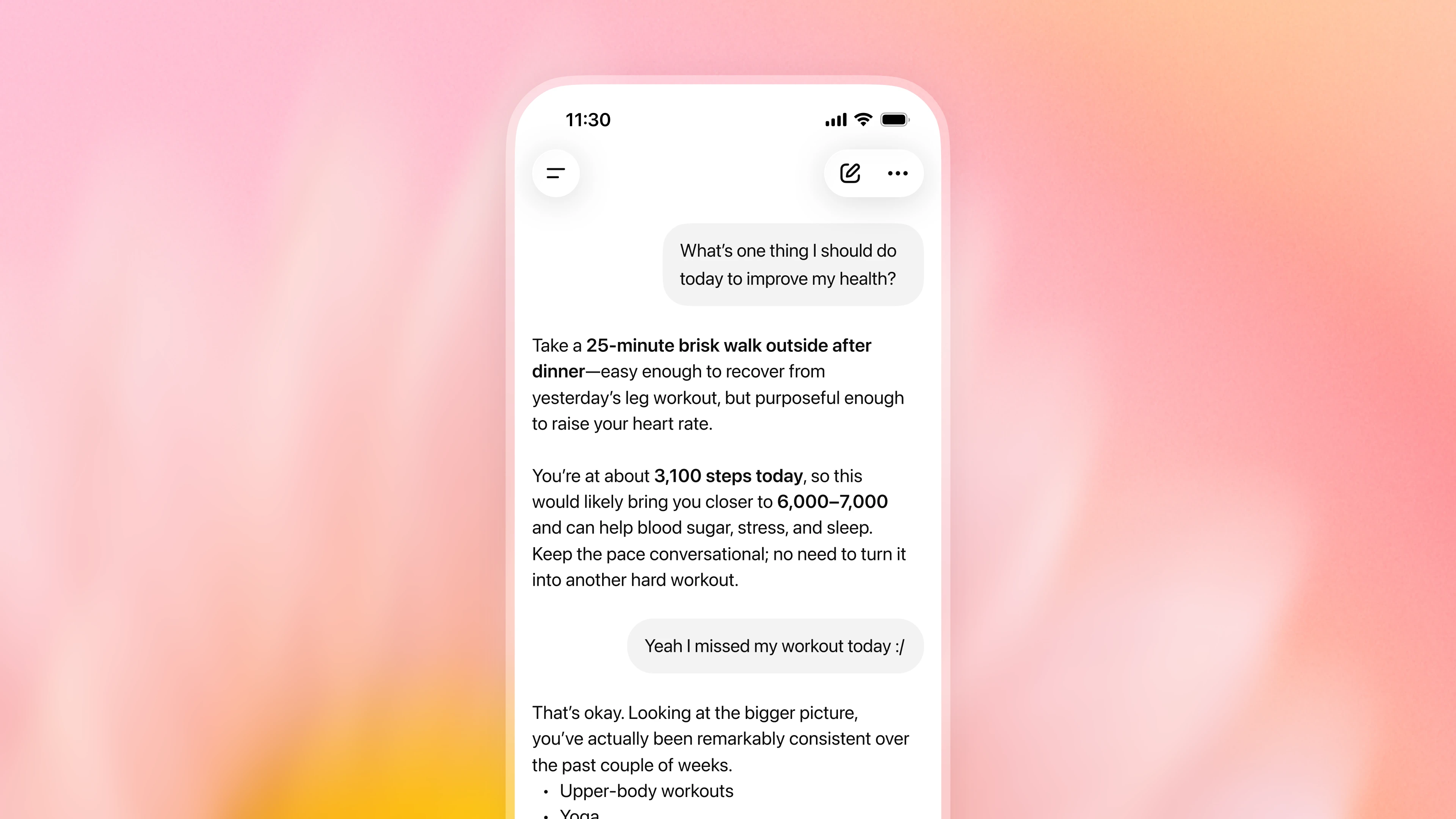
基于这一反馈,您现在可以选择让 ChatGPT 在对话中调用您在健康功能中连接的相关信息,无需从健康功能内启动。在获得您的许可后,ChatGPT 可以综合考虑您连接的相关信息(如药物、化验结果、近期就诊、睡眠和活动)以及您分享的目标和背景。这种额外背景信息能让日常对话更有价值。例如,ChatGPT 可以在帮您选择餐厅时考虑饮食限制,或在规划低强度家庭周末活动时考虑您近期的受伤情况。您可以提出后续问题、补充背景信息,或纠正不完整或过时的信息。
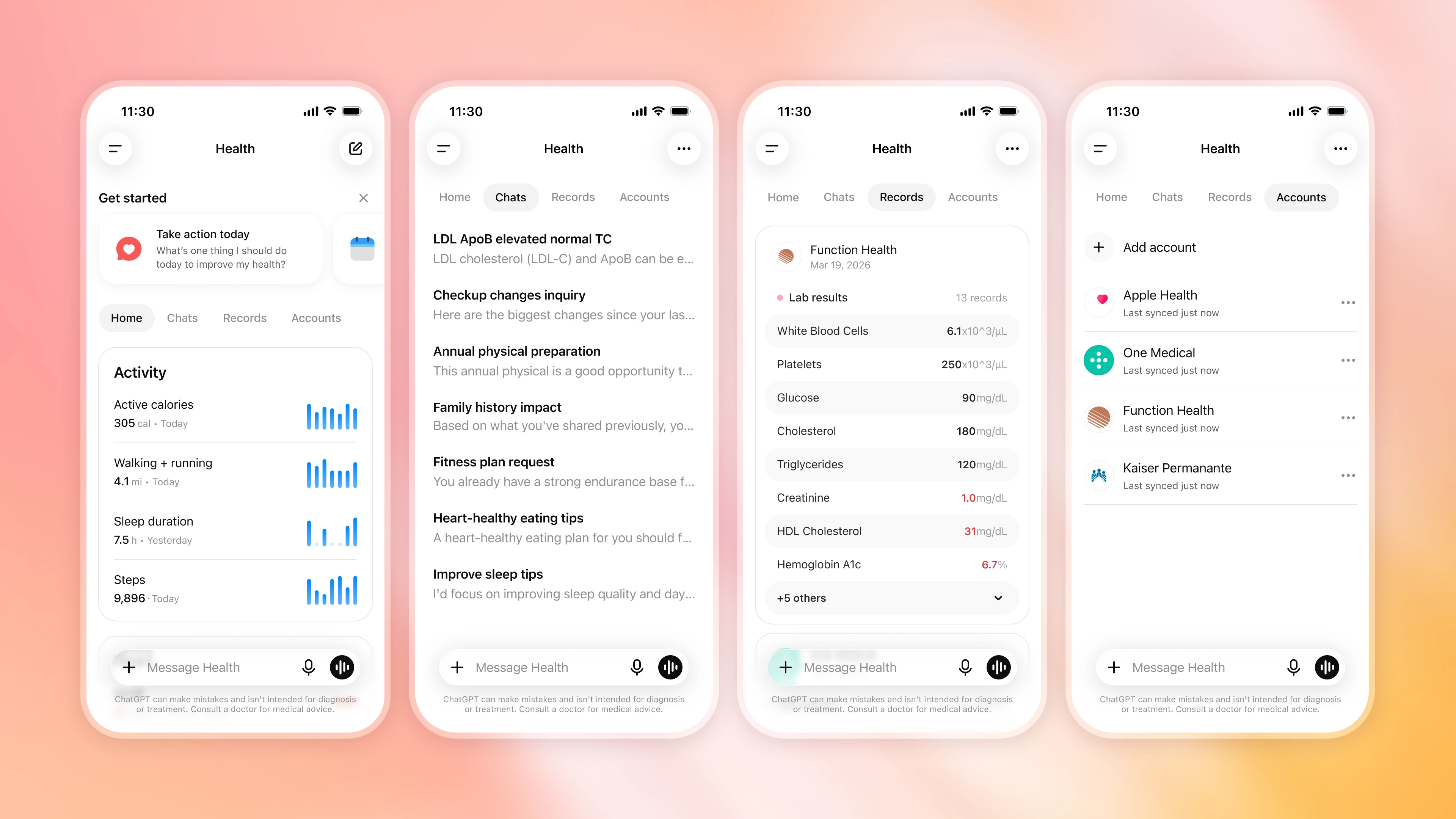
左侧边栏中的健康功能仍然是您连接和管理信息、查看近期数据和趋势、探索推荐提示、浏览同步记录以及回顾过往健康对话的基地。
与医生合作提升健康智能
我们通过专项训练来改进 ChatGPT 健康对话背后的模型。免费版用户可用的 GPT‑5.5 Instant 在识别紧急护理需求、询问相关背景、解释不确定性以及简化复杂信息方面取得了显著进步。在我们最具挑战性的健康评估中,其表现达到了评估时前沿思维模型的水平。了解更多相关结果及我们与医生的合作。
付费用户可用的 GPT‑5.6 Sol 是我们目前最强的健康模型。它在需要复杂细节推理、清晰沟通和审慎判断的任务上表现更优。它能帮助用通俗语言解释就诊记录、理解化验结果随时间的变化、权衡医生讨论的各种选项因素,或为复诊准备问题。
为衡量进展,我们与全球数百名医生合作,开发逼真的健康场景和详细的评分标准,以定义优质回答应具备的特质。这些评估涵盖准确性、安全性、沟通能力、情境意识、完整性和适当升级处理等维度。每个 GPT‑5.6 模型在 HealthBench Professional(一项评估 AI 在复杂健康任务中表现的基准测试)上的表现均优于 GPT‑5.5。
最后,医生在发布前对 ChatGPT 健康功能进行了广泛测试,帮助我们衡量和提升模型在连接健康数据后的实际表现与安全性。虽然这些成果代表着重要进展,且我们持续改进模型,但 ChatGPT 仍可能出错,不能替代合格医疗专业人员的护理和判断。我们鼓励用户核实重要信息,并与医疗服务提供者讨论医疗决策。
以隐私、安全和控制为核心构建
健康功能采用分层隐私与安全保护措施。所有 ChatGPT 对话在静态和传输过程中均经过加密,健康功能中连接的信息将获得额外的加密保护。
健康功能中连接的信息不会用于训练我们的基础模型或定向广告。 无论您为 ChatGPT 选择何种模型训练设置,已连接的医疗记录、Apple 健康信息以及使用这些信息的对话,均不会用于训练我们的基础模型或定向广告。未使用这些数据的对话将遵循您为 ChatGPT 设定的标准模型训练设置,您可随时在“设置 > 数据控制”中更改该设置。
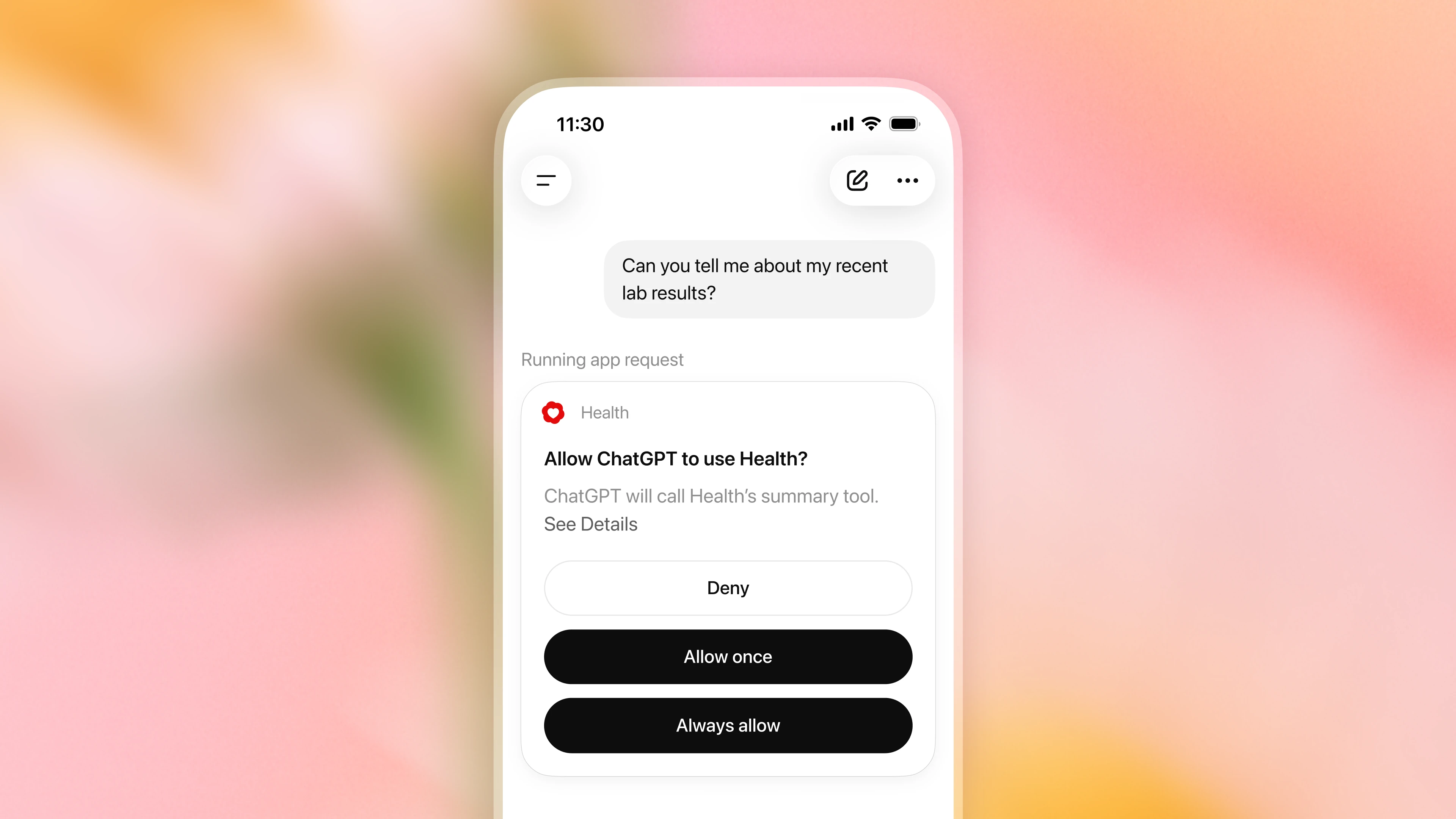
您决定 ChatGPT 何时可使用健康功能中连接的信息。 默认情况下,ChatGPT 在使用已连接的医疗记录和 Apple 健康信息个性化回复前会请求权限。您可以批准每次请求,或选择始终允许访问(这将关闭权限提示)。您可随时在“设置 > 插件 > 健康”中更改此设置。
您可以随时断开健康信息的连接。 在“健康 > 账户”中随时断开账户连接。断开后,从该来源同步的数据将在 30 天内从 OpenAI 系统中删除。已包含在 ChatGPT 对话历史中的信息将保留,直至您删除这些对话。
记忆功能仍由您掌控。 为个性化未来聊天,系统可能根据您的健康对话创建记忆。记忆不会直接从已连接的医疗记录和 Apple 健康信息中创建。若您希望在不创建记忆的情况下进行对话,可使用临时聊天(在新窗口中打开),或在“设置 > 记忆”中关闭记忆功能。
额外保护措施有助于保障敏感信息的安全共享。 在 ChatGPT 对其他已连接插件执行可能泄露健康信息的操作前(例如根据您的 Apple 健康数据向跑步伙伴发送训练计划),额外保护措施将协助检查该共享行为是否符合您的请求。对于某些敏感操作,ChatGPT 可能会在继续前要求您确认。我们持续通过针对健康功能中连接信息的专项红队演练来测试这些保护措施,并利用测试结果加强防护。
如何连接和使用您的健康信息
您无需连接任何信息即可在 ChatGPT 中提出健康问题。如需使用健康功能并获得基于您个人信息的回复,您可以选择连接 Apple 健康、美国医院系统支持的医疗记录、One Medical 或 Function Health。
连接您的健康信息
从 ChatGPT 的侧边栏或“更多”菜单中打开“健康”,然后选择“开始使用”。ChatGPT 将引导您安全连接健康信息。
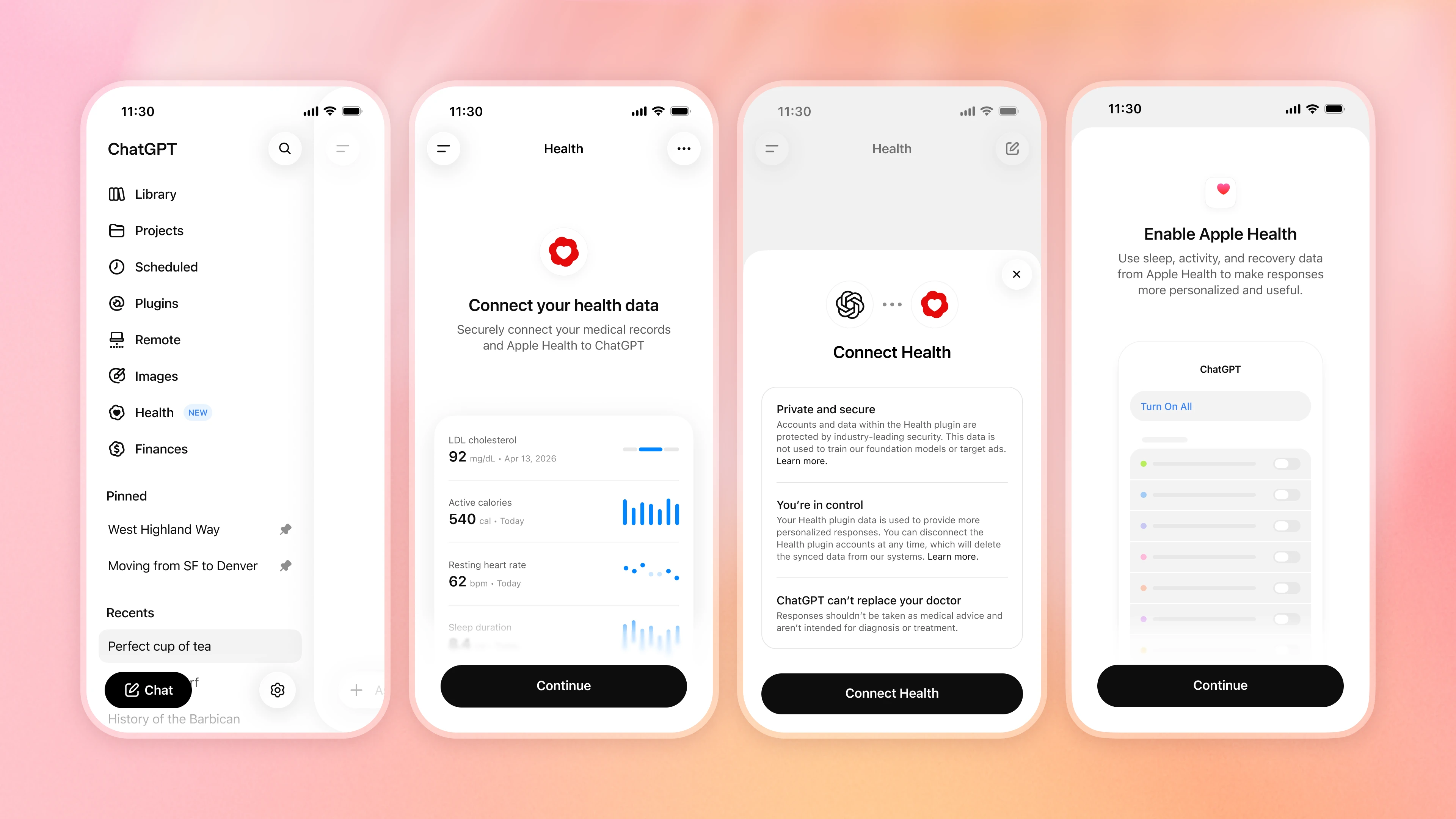
连接后,您的信息将开始同步,可能需要几分钟。同步期间,您可以连接其他账户或稍后返回。
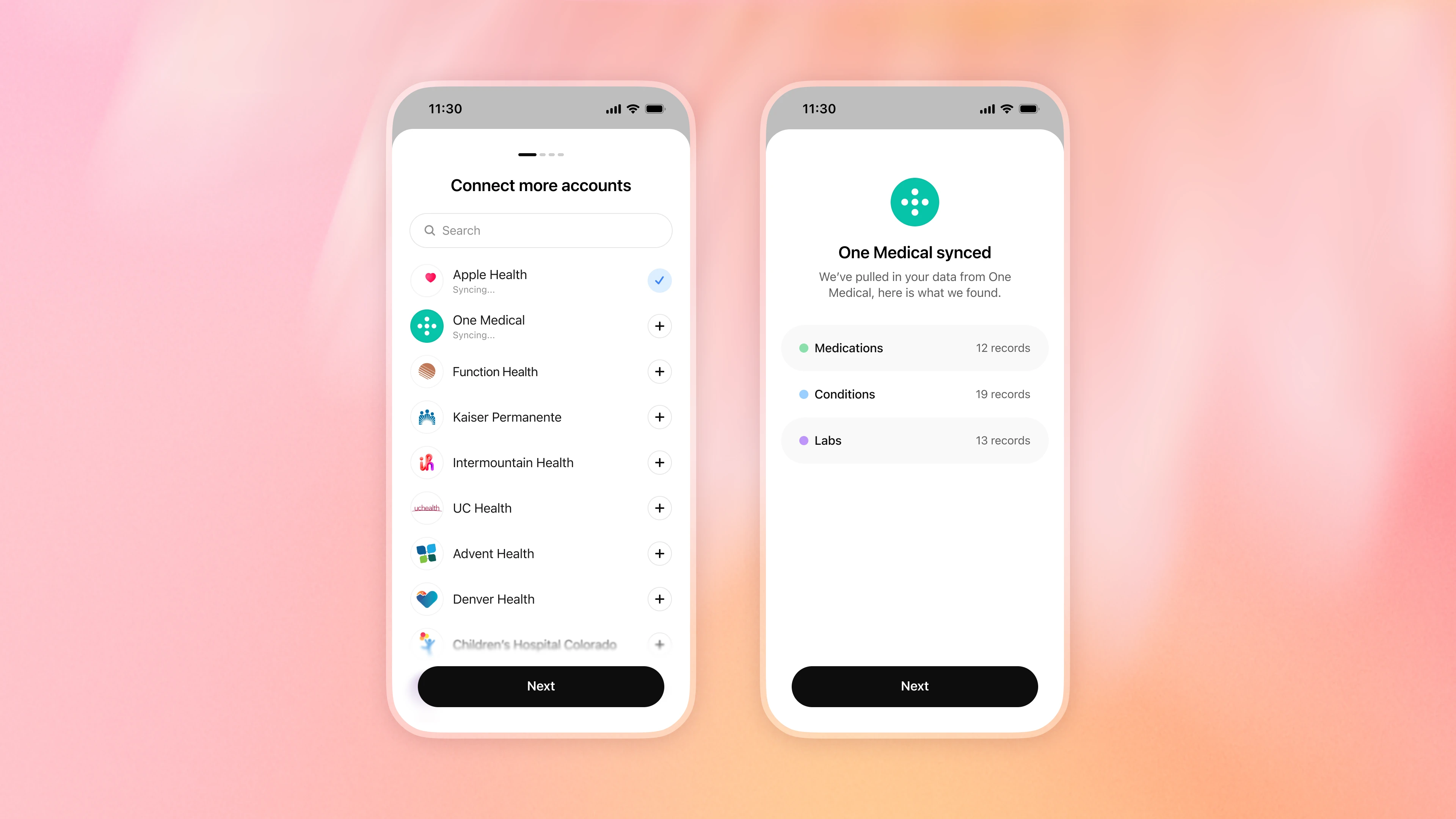
使用可穿戴设备或其他健康应用?
如果您使用与 Apple 健康共享数据的可穿戴设备、健身或营养应用,请确保共享功能已开启。将 Apple 健康连接到 ChatGPT 后,在您允许的情况下,ChatGPT 可使用该应用通过 Apple 健康提供的信息。可用信息因应用和指标而异,部分专有评分可能无法传输。
查看和更新相关健康详情
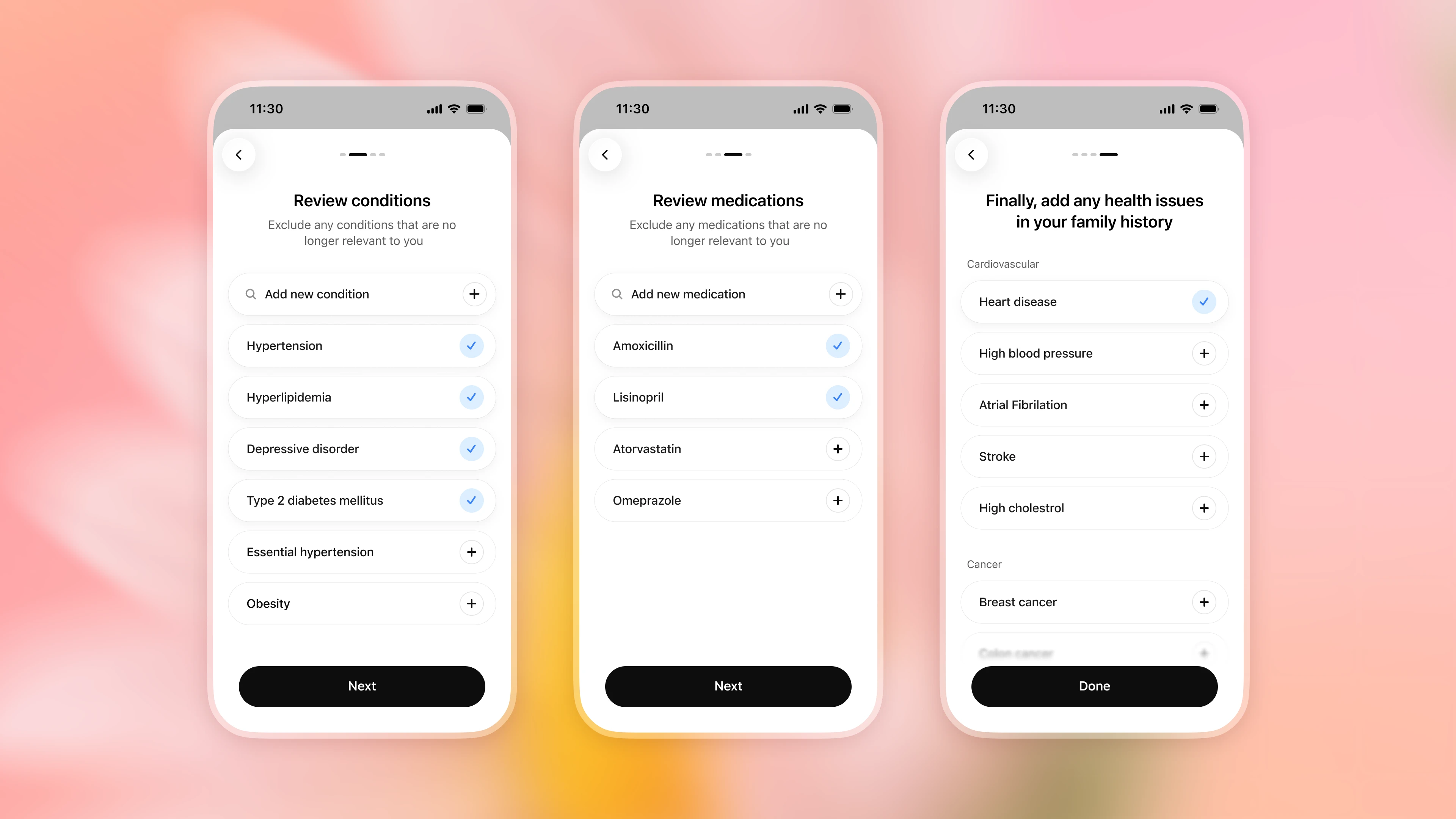
连接后,您可以查看病症和药物、移除不再相关的内容,并添加可能缺失的详细信息(包括家族健康史)。已连接的信息可能并非始终完整或最新(例如,停药后药物可能仍会列出),因此当情况发生变化时请告知 ChatGPT,并对照原始来源核对重要细节。
将健康背景带入对话
信息同步后,您可以在 ChatGPT 的任何位置提问。在相关情况下,ChatGPT 可能根据您的权限使用健康信息。默认情况下,ChatGPT 在使用这些信息前会请求权限。您可以选择允许一次或始终允许,并随时在“设置 > 插件 > 健康”中更改此设置。您也可以在消息中添加 @Health,明确要求 ChatGPT 纳入健康背景。
探索和管理您的健康信息
随时返回“健康”功能查看近期数据和趋势、查找建议提示、浏览同步记录、回顾过往对话以及管理已连接的账户。
Health in ChatGPT is launching to U.S. users. You can choose to securely connect Apple Health and supported medical records so ChatGPT can help you understand your information in context, keep track of what has changed, and have more informed, personalized conversations. The experience builds on feedback from early testers and gives you control over what you connect and when ChatGPT can use it.
Every week, more than 300 million people turn to ChatGPT with health-related questions—from understanding a lab result and preparing for an appointment to making sense of what a doctor said and building a healthier routine. But the context behind those questions is often scattered across patient portals, medical records, apps, and wearables, making it difficult to see and act on the complete picture.
With your permission, ChatGPT can now draw on relevant information you’ve connected in Health to help you compare a new result with prior tests, summarize changes since your last appointment, or explore how sleep, activity, and workouts relate to your routine. This can reduce the need to repeatedly gather, upload, or explain the same details, helping you feel more informed, ask better questions, and take a more active role in your health while supporting, not replacing, the care you receive from medical professionals.
We’re continuing to improve the models behind health conversations so ChatGPT can reason more carefully across complex details, explain health information clearly, ask for missing context, and recognize when professional care may be needed. GPT‑5.5 Instant brought frontier health intelligence to all free users. GPT‑5.6 Sol builds on that progress with even stronger performance on more complex questions.
Health is built with layered privacy and security safeguards. Connected medical records and Apple Health information, and conversations that use it, are not used to train our foundation models or target ads. We’re beginning to roll out Health to logged-in ChatGPT users 18 and older in the U.S. on web and iOS across Free, Go, Plus, and Pro plans today. Open Health from the sidebar in ChatGPT to get started. Health is not yet available in Codex.
What early users are saying
“The most useful part has been turning scattered medical history into something I can actually understand and explain. I have multiple overlapping issues and ChatGPT helped connect those pieces into a clear timeline, explain the medical terms in plain English, and create summaries I could share with a physical therapist or trainer.
This has helped me feel less lost in my own health history. Instead of just seeing disconnected diagnoses, imaging results, and surgery notes, I could understand the bigger pattern. It made the information more usable and gave me better language to advocate for myself with providers and trainers.”
—Blake, technical program manager
Health conversations grounded in your information
Earlier this year, we introduced a dedicated health experience to a limited group of users that required visiting a separate space in ChatGPT to get the full benefit. Early testing showed that health questions often arose naturally in the course of conversations. For example, while planning meals or looking for recipes, someone might want ChatGPT to take a food allergy or dietary restriction into account. Among people with access, more than 70% of health-related conversations took place outside the dedicated health experience. Moving to a separate space added an unnecessary step.
Based on that feedback, you can now choose to let ChatGPT draw on relevant information you’ve connected in Health across your conversations, without needing to start within Health. With your permission, ChatGPT can consider relevant information you have connected, such as medications, lab results, recent visits, sleep, and activity, alongside the goals and context you share. This added context can make everyday conversations more useful. For example, ChatGPT can consider a dietary restriction when helping you choose a restaurant, or a recent injury when planning lower-impact weekend activities with your family. You can ask follow-up questions, add context, or correct information that is incomplete or out of date.
Health, in the left sidebar, remains your home base for connecting and managing your information, seeing recent data and trends, exploring suggested prompts, browsing synced records, and returning to past health conversations.
Improving health intelligence with physicians
We use dedicated training to improve the models behind health conversations in ChatGPT. GPT‑5.5 Instant, available to users on the Free plan, has made meaningful gains in recognizing when urgent care may be needed, asking for relevant context, explaining uncertainty, and making complex information easier to understand. On our most challenging health evaluations, it performed at a level comparable to our frontier Thinking models at the time of evaluation. Learn more about those results and our work with physicians.
GPT‑5.6 Sol, available to paid users, is our strongest model yet for health. It builds on our progress with stronger performance on tasks that require reasoning across complex details, clear communication, and careful judgment. It can help explain a visit note in plain language, understand how lab results have changed over time, consider the factors across options a doctor discussed, or prepare questions for a follow-up appointment.
To measure progress, we work with hundreds of physicians around the world to develop realistic health scenarios and detailed rubrics that define what a strong response should do. These evaluations assess qualities including accuracy, safety, communication, context awareness, completeness, and appropriate escalation. Every GPT‑5.6 model outperformed GPT‑5.5 on HealthBench Professional(opens in a new window), an evaluation of AI performance on challenging health tasks.
Finally, physicians extensively tested Health in ChatGPT before release, helping us measure and improve real-world model performance and safety with connected health data. While these results represent meaningful progress and we are continuously improving our models, ChatGPT can still make mistakes and does not replace the care and judgment of qualified medical professionals. We encourage people to verify important information and discuss medical decisions with their healthcare provider.
Built with privacy, security, and control
Health is built with layered privacy and security safeguards. All ChatGPT conversations are encrypted at rest and in transit, and information connected in Health receives additional encryption protections.
**The information connected in Health is not used to train our foundation models or target ads.**Connected medical records and Apple Health information, and conversations that use it, are not used to train our foundation models or target ads, regardless of the model-training setting you choose for ChatGPT. Conversations that do not use this data follow your standard ChatGPT model-training setting choices, which you can change at any time in Settings > Data Controls.
**You decide when ChatGPT can use the information connected in Health.**By default, ChatGPT asks for permission before using connected medical records and Apple Health information to personalize a response. You can approve each request or choose to always allow access, which turns off these permission prompts. You can change this setting anytime in Settings > Plugins > Health.
You can disconnect your Health information at any time. Disconnect accounts at any time in Health > Accounts. When you do, data synced from that source is deleted from OpenAI’s systems within 30 days. Information already included in your ChatGPT conversation history remains until you delete those conversations.
Memory remains in your control. To personalize future chats, memories can be created from your Health conversations. Memories are not created directly from connected medical records and Apple Health information. If you’d like to have a conversation without creating memories, you can use Temporary Chat(opens in a new window) or turn memory off in Settings > Memory.
**Additional safeguards help protect sensitive sharing.**Before ChatGPT takes an action in another connected plugin that could disclose Health information, like sending your running partner a training plan based on your Apple Health data, additional safeguards help check that the sharing matches your request. For some sensitive actions, ChatGPT may ask you to confirm before proceeding. We continue to test these safeguards through dedicated red-team exercises focused on connected information in Health and use the findings to strengthen our protections.
How to connect and use your health information
You can ask health questions in ChatGPT without connecting anything. To use Health and get responses grounded in your own information, you can choose to connect Apple Health, supported medical records from U.S. hospital systems, One Medical, or Function Health.
Connect your health information
Open Health from the sidebar or More menu in ChatGPT and select “Get started.” ChatGPT will guide you through securely connecting your health information.
Once connected, your information will begin syncing, which may take a few minutes. While it syncs, you can connect additional accounts or return later.
Using a wearable or another health app?
If you use a wearable, fitness, or nutrition app that shares data with Apple Health, make sure sharing is turned on. Once you connect Apple Health to ChatGPT, ChatGPT can use the information that app makes available through Apple Health, when you allow it. Available information varies by app and metric, and some proprietary scores may not transfer.
Review and update relevant health details
After connecting, you can review conditions and medications, remove anything that is no longer relevant, and add details that may be missing, including family health history. Connected information may not always be complete or current, for example, a medication may remain listed after you stop taking it, so tell ChatGPT when something changes and check important details against the original source.
Bring your health context into conversations
Once your information is synced, you can ask questions anywhere in ChatGPT. When relevant, ChatGPT may use Health information based on your permissions. By default, ChatGPT asks before using this information. You can allow access once or choose to always allow it, and can change this setting anytime in Settings > Plugins > Health. You can also add @Health to your message to explicitly ask ChatGPT to include health context.
Explore and manage your health information
Return to Health anytime to see recent data and trends, find suggested prompts, browse synced records, revisit past conversations, and manage your connected accounts.
本文内容采集自官方网站,排版和翻译可能与原页面存在差异。
阅读官方全文